Dain_Od
MYA Member
-
Joined
-
Last visited
-
We have a credit card sized membership card, issued yearly, but double the width. It is then folded in half to be the right size. Members are given a lanyard and clear cover. On the outside front is member name and club number. On the outside back is our lock numbers. The inside has space for Member Address, Emergency Contact details, Medical details and Medication and what3words for the main gate for emergency services, our lake is off the beaten track and mobile service is minimal. Members are expected to carry the card at the lake having completed the inside private info. As the card is held inside the cover the only time the private info would be seen is in an emergency when it is taken out the cover. The club then has no need to keep the private data, if it is held then regular audits need to be made to update and delete as necessary. Blank card can then be issued to visitors.
-
On a Futaba 3vcs I use idle up on the throttle when in the sheeted in position, using a 3 position switch this gives me High mode: Pointing closer to the wind but going slower, (sheet in 5%) VMG mode: The best VMG for your boat Fast mode: Pointing less into the wind but going faster, (sheet out 5-10%) This also helps when wind is at the top of the range for a rig. The 3VCS was a specialised car Tx so not sure if aircraft idle up can be made to work the same.
-
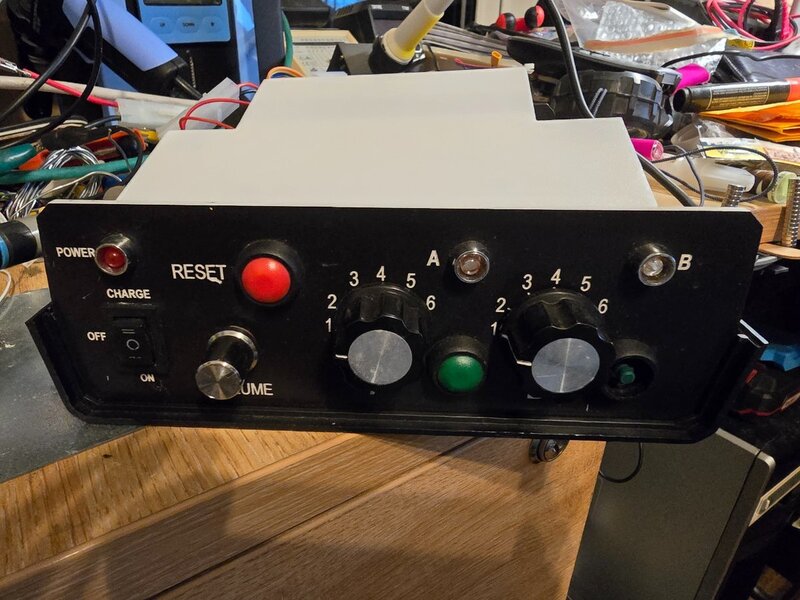
Does anybody have the instructions for the countdown timer shown in the picture. The processor has failed and I am reverse engineering the code. It would help if I can confirm what the switches select, there are 7 sound files but only 6 switch positions. Once complete I am happy to supply the code for others to use.